HOTSPOT -
You have a web application that uses a MongoDB database. You plan to migrate the web application to Azure.
You must migrate to Cosmos DB while minimizing code and configuration changes.
You need to design the Cosmos DB configuration.
What should you recommend? To answer, select the appropriate values in the answer area.
NOTE: Each correct selection is worth one point.
Hot Area: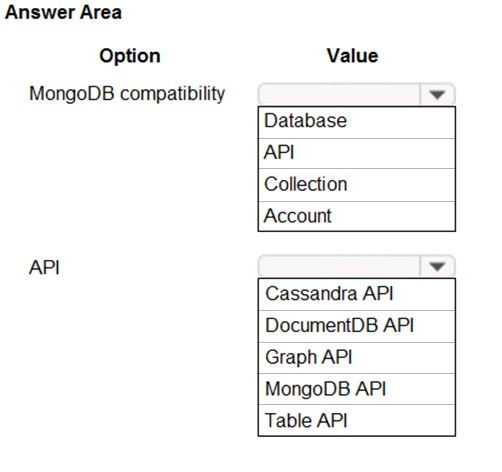
Correct Answer:
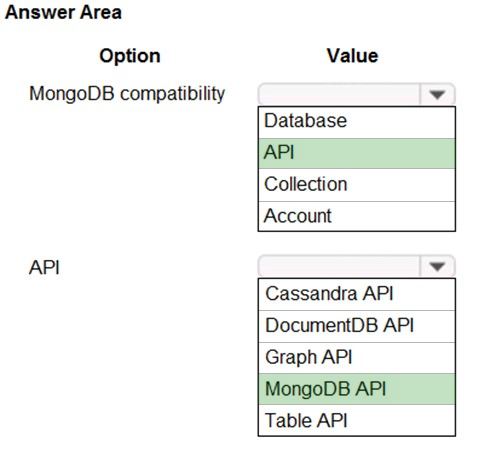
MongoDB compatibility: API -
API: MongoDB API -
Azure Cosmos DB comes with multiple APIs:
✑ SQL API, a JSON document database service that supports SQL queries. This is compatible with the former Azure DocumentDB.
✑ MongoDB API, compatible with existing Mongo DB libraries, drivers, tools and applications.
✑ Cassandra API, compatible with existing Apache Cassandra libraries, drivers, tools, and applications.
✑ Azure Table API, a key-value database service compatible with existing Azure Table Storage.
✑ Gremlin (graph) API, a graph database service supporting Apache Tinkerpopג€™s graph traversal language, Gremlin.
Reference:
https://docs.microsoft.com/en-us/azure/cosmos-db/create-mongodb-dotnet
You have 100 servers that run Windows Server 2012 R2 and host Microsoft SQL Server 2014 instances. The instances host databases that have the following characteristics:
✑ The largest database is currently 3 TB. None of the databases will ever exceed 4 TB.
✑ Stored procedures are implemented by using CLR.
You plan to move all the data from SQL Server to Azure.
You need to recommend an Azure service to host the databases. The solution must meet the following requirements:
✑ Whenever possible, minimize management overhead for the migrated databases.
✑ Minimize the number of database changes required to facilitate the migration.
✑ Ensure that users can authenticate by using their Active Directory credentials.
What should you include in the recommendation?
Correct Answer:
B
Reference:
https://docs.microsoft.com/en-us/azure/sql-database/sql-database-managed-instance
Note: This question is part of a series of questions that present the same scenario. Each question in the series contains a unique solution that might meet the stated goals. Some question sets might have more than one correct solution, while others might not have a correct solution.
After you answer a question in this section, you will NOT be able to return to it. As a result, these questions will not appear in the review screen.
You have an Azure Storage account that contains two 1-GB data files named File1 and File2. The data files are set to use the archive access tier.
You need to ensure that File1 is accessible immediately when a retrieval request is initiated.
Solution: For File1, you set Access tier to Hot.
Does this meet the goal?
Correct Answer:
A
The hot access tier has higher storage costs than cool and archive tiers, but the lowest access costs. Example usage scenarios for the hot access tier include:
✑ Data that's in active use or expected to be accessed (read from and written to) frequently.
✑ Data that's staged for processing and eventual migration to the cool access tier.
Reference:
https://docs.microsoft.com/en-us/azure/storage/blobs/storage-blob-storage-tiers
Note: This question is part of a series of questions that present the same scenario. Each question in the series contains a unique solution that might meet the stated goals. Some question sets might have more than one correct solution, while others might not have a correct solution.
After you answer a question in this section, you will NOT be able to return to it. As a result, these questions will not appear in the review screen.
You have an Azure Storage account that contains two 1-GB data files named File1 and File2. The data files are set to use the archive access tier.
You need to ensure that File1 is accessible immediately when a retrieval request is initiated.
Solution: You add a new file share to the storage account.
Does this meet the goal?
Correct Answer:
B