Your company wants to use an Azure Active Directory (Azure AD) hybrid identity solution.
You need to ensure that users can authenticate if the internet connection to the on-premises Active Directory is unavailable. The solution must minimize authentication prompts for the users.
What should you include in the solution?
HOTSPOT -
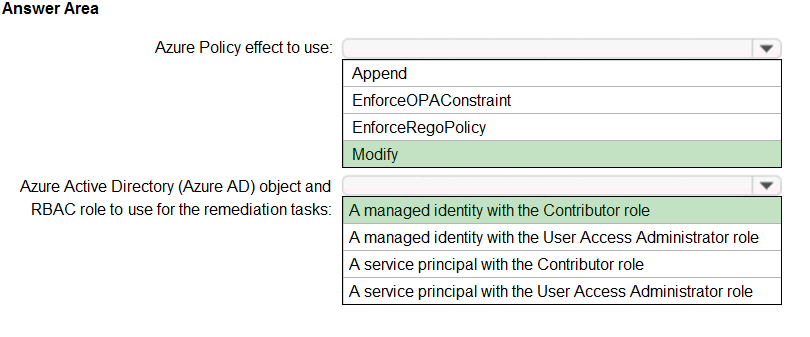
You need to design an Azure policy that will implement the following functionality:
✑ For new resources, assign tags and values that match the tags and values of the resource group to which the resources are deployed.
✑ For existing resources, identify whether the tags and values match the tags and values of the resource group that contains the resources.
✑ For any non-compliant resources, trigger auto-generated remediation tasks to create missing tags and values.
The solution must use the principle of least privilege.
What should you include in the design? To answer, select the appropriate options in the answer area.
NOTE: Each correct selection is worth one point.
Hot Area: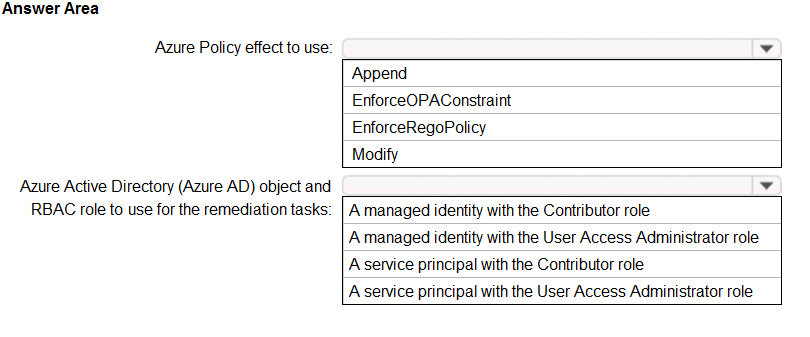
Note: This question is part of a series of questions that present the same scenario. Each question in the series contains a unique solution that might meet the stated goals. Some question sets might have more than one correct solution, while others might not have a correct solution.
After you answer a question in this section, you will NOT be able to return to it. As a result, these questions will not appear in the review screen.
Your company has an on-premises Active Directory Domain Services (AD DS) domain and an established Azure Active Directory (Azure AD) environment.
Your company would like users to be automatically signed in to cloud apps when they are on their corporate desktops that are connected to the corporate network.
You need to enable single sign-on (SSO) for company users.
Solution: Install and configure an Azure AD Connect server to use password hash synchronization and select the ג€Enable single sign-onג€ option.
Does the solution meet the goal?
Note: This question is part of a series of questions that present the same scenario. Each question in the series contains a unique solution that might meet the stated goals. Some question sets might have more than one correct solution, while others might not have a correct solution.
After you answer a question in this section, you will NOT be able to return to it. As a result, these questions will not appear in the review screen.
Your company has an on-premises Active Directory Domain Services (AD DS) domain and an established Azure Active Directory (Azure AD) environment.
Your company would like users to be automatically signed in to cloud apps when they are on their corporate desktops that are connected to the corporate network.
You need to enable single sign-on (SSO) for company users.
Solution: Install and configure an Azure AD Connect server to use pass-through authentication and select the ג€Enable single sign-onג€ option.
Does the solution meet the goal?
Correct Answer:
A
Azure Active Directory Seamless Single Sign-On (Azure AD Seamless SSO) automatically signs users in when they are on their corporate devices connected to your corporate network. When enabled, users don't need to type in their passwords to sign in to Azure AD, and usually, even type in their usernames. This feature provides your users easy access to your cloud-based applications without needing any additional on-premises components.
Seamless SSO can be combined with either the Password Hash Synchronization or Pass-through Authentication sign-in methods.
Reference:
https://docs.microsoft.com/en-us/azure/active-directory/hybrid/how-to-connect-sso