Note: This question is part of a series of questions that present the same scenario. Each question in the series contains a unique solution that might meet the stated goals. Some question sets might have more than one correct solution, while others might not have a correct solution.
After you answer a question in this section, you will NOT be able to return to it. As a result, these questions will not appear in the review screen.
Your company has an on-premises Active Directory Domain Services (AD DS) domain and an established Azure Active Directory (Azure AD) environment.
Your company would like users to be automatically signed in to cloud apps when they are on their corporate desktops that are connected to the corporate network.
You need to enable single sign-on (SSO) for company users.
Solution: Configure an AD DS server in an Azure virtual machine (VM). Configure bidirectional replication.
Does the solution meet the goal?
Correct Answer:
B
Instead install and configure an Azure AD Connect server.
Reference:
https://docs.microsoft.com/en-us/azure/active-directory/hybrid/how-to-connect-sso
You are designing an Azure web app that will use Azure Active Directory (Azure AD) for authentication.
You need to recommend a solution to provide users from multiple Azure AD tenants with access to App1. The solution must ensure that the users use Azure Multi-
Factor Authentication (MFA) when they connect to App1.
Which two types of objects should you include in the recommendation? Each correct answer presents part of the solution.
NOTE: Each correct selection is worth one point.
Correct Answer:
AF
A: The Conditional Access feature in Azure Active Directory (Azure AD) offers one of several ways that you can use to secure your app and protect a service.
Conditional Access enables developers and enterprise customers to protect services in a multitude of ways including:
✑ Multi-factor authentication
✑ Allowing only Intune enrolled devices to access specific services
✑ Restricting user locations and IP ranges
Conditional Access policies are powerful tools, we recommend excluding the following accounts from your policy:
✑ Service accounts and service principals.
If your organization has these accounts in use in scripts or code, consider replacing them with managed identities.
Incorrect Answers:
B: Managed Identity does not support cross-directory scenarios.
E: Application security groups enable you to configure network security as a natural extension of an applicationג€™s structure, allowing you to group virtual machines and define network security policies based on those groups.
Note: The correct options should be application registration with Azure, this will allow the authentication of users on the AD to access the application. A default application registration validates that the user has valid login credentials. This can be your Active Directory or in case of a multi-tenant application the directory where the user is originated from.
Reference:
https://docs.microsoft.com/en-us/azure/active-directory/develop/v2-conditional-access-dev-guide https://docs.microsoft.com/en-us/azure/active-directory/conditional-access/howto-conditional-access-policy-azure-management https://www.re-mark-able.net/understanding-azure-active-directory-application-registrations/
You need to create an Azure Storage account that uses a custom encryption key.
What do you need to implement the encryption?
Correct Answer:
A
You can use your own encryption key to protect the data in your storage account. When you specify a customer-managed key, that key is used to protect and control access to the key that encrypts your data.
You must use either Azure Key Vault or Azure Key Vault Managed Hardware Security Model (HSM) (preview) to store your customer-managed keys.
HOTSPOT -
You plan to create an Azure environment that will have a root management group and five child management groups. Each child management group will contain five Azure subscriptions. You plan to have between 10 and 30 resource groups in each subscription.
You need to design a solution for the planned environment. The solution must meet the following requirements:
Prevent users who are assigned the Owner role for the subscriptions from deleting the resource groups from their respective subscription.
✑ Ensure that you can update RBAC role assignments across all the subscriptions and resource groups.
✑ Minimize administrative effort.
What should you include in the solution? To answer, select the appropriate options in the answer area.
NOTE: Each correct selection is worth one point.
Hot Area: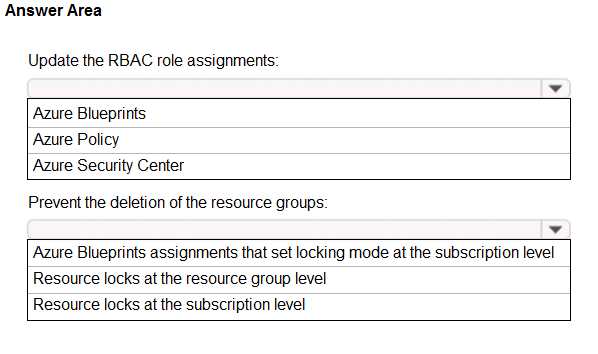
Correct Answer:
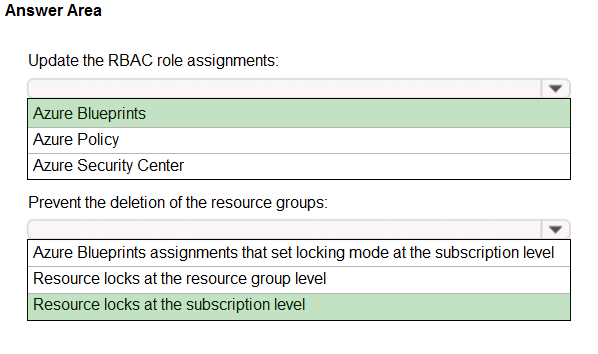
Box 1: Azure Blueprints -
Blueprints are a declarative way to orchestrate the deployment of various resource templates and other artifacts such as:
Role Assignments -
Policy Assignments -
Azure Resource Manager templates (ARM templates)
Resource Groups -
Incorrect:
A policy is a default allow and explicit deny system focused on resource properties during deployment and for already existing resources.
Box 2: Resource locks at the subscription level
To minimize administrative effort lock at the subscription level.
Note: As an administrator, you can lock a subscription, resource group, or resource to prevent other users in your organization from accidentally deleting or modifying critical resources.
Reference:
https://docs.microsoft.com/en-us/azure/governance/blueprints/overview https://docs.microsoft.com/en-us/azure/azure-resource-manager/management/lock-resources