HOTSPOT -
You configure OAuth2 authorization in API Management as shown in the following exhibit.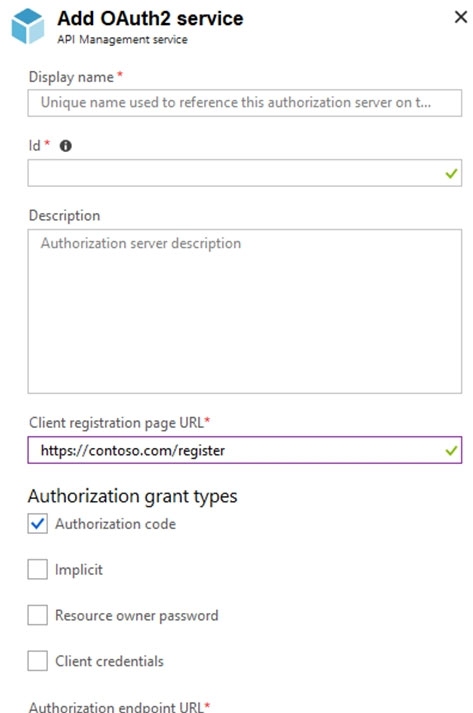
Use the drop-down menus to select the answer choice that completes each statement based on the information presented in the graphic.
NOTE: Each correct selection is worth one point.
Hot Area: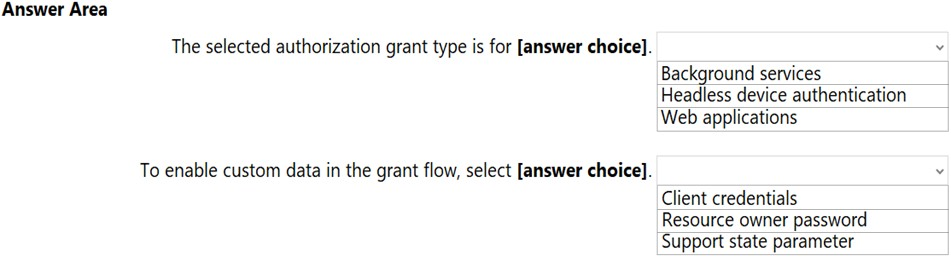
Correct Answer:
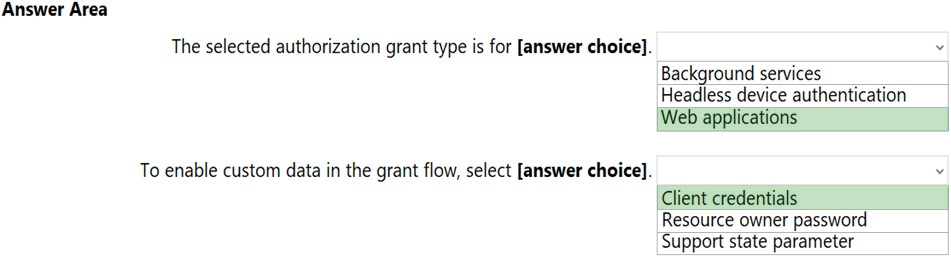
Box 1: Web applications -
The Authorization Code Grant Type is used by both web apps and native apps to get an access token after a user authorizes an app.
Note: The Authorization Code grant type is used by confidential and public clients to exchange an authorization code for an access token.
After the user returns to the client via the redirect URL, the application will get the authorization code from the URL and use it to request an access token.
Incorrect Answers:
Not Headless device authentication:
A headless system is a computer that operates without a monitor, graphical user interface (GUI) or peripheral devices, such as keyboard and mouse.
Headless computers are usually embedded systems in various devices or servers in multi-server data center environments. Industrial machines, automobiles, medical equipment, cameras, household appliances, airplanes, vending machines and toys are among the myriad possible hosts of embedded systems.
Box 2: Client Credentials -
How to include additional client data
In case you need to store additional details about a client that don't fit into the standard parameter set the custom data parameter comes to help:
POST /c2id/clients HTTP/1.1 -
Host: demo.c2id.com -
Content-Type: application/json -
Authorization: Bearer ztucZS1ZyFKgh0tUEruUtiSTXhnexmd6
{
"redirect_uris" : [ "https://myapp.example.com/callback" ],
"data" : { "reg_type" : "3rd-party",
"approved" : true,
"author_id" : 792440 }
}
The data parameter permits arbitrary content packaged in a JSON object. To set it you will need the master registration token or a one-time access token with a client-reg:data scope.
Incorrect Answers:
Authorization protocols provide a state parameter that allows you to restore the previous state of your application. The state parameter preserves some state object set by the client in the Authorization request and makes it available to the client in the response.
Reference:
https://developer.okta.com/blog/2018/04/10/oauth-authorization-code-grant-type https://connect2id.com/products/server/docs/guides/client-registration
Note: This question is part of a series of questions that present the same scenario. Each question in the series contains a unique solution that might meet the stated goals. Some question sets might have more than one correct solution, while others might not have a correct solution.
After you answer a question in this section, you will NOT be able to return to it. As a result, these questions will not appear in the review screen.
Your company has deployed several virtual machines (VMs) on-premises and to Azure. Azure ExpressRoute has been deployed and configured for on-premises to Azure connectivity.
Several VMs are exhibiting network connectivity issues.
You need to analyze the network traffic to determine whether packets are being allowed or denied to the VMs.
Solution: Use Azure Network Watcher to run IP flow verify to analyze the network traffic.
Does the solution meet the goal?
Correct Answer:
A
The Network Watcher Network performance monitor is a cloud-based hybrid network monitoring solution that helps you monitor network performance between various points in your network infrastructure. It also helps you monitor network connectivity to service and application endpoints and monitor the performance of
Azure ExpressRoute.
Note:
IP flow verify checks if a packet is allowed or denied to or from a virtual machine. The information consists of direction, protocol, local IP, remote IP, local port, and remote port. If the packet is denied by a security group, the name of the rule that denied the packet is returned. While any source or destination IP can be chosen,
IP flow verify helps administrators quickly diagnose connectivity issues from or to the internet and from or to the on-premises environment.
IP flow verify looks at the rules for all Network Security Groups (NSGs) applied to the network interface, such as a subnet or virtual machine NIC. Traffic flow is then verified based on the configured settings to or from that network interface. IP flow verify is useful in confirming if a rule in a Network Security Group is blocking ingress or egress traffic to or from a virtual machine.
Reference:
https://docs.microsoft.com/en-us/azure/network-watcher/network-watcher-monitoring-overview https://docs.microsoft.com/en-us/azure/network-watcher/network-watcher-ip-flow-verify-overview
Note: This question is part of a series of questions that present the same scenario. Each question in the series contains a unique solution that might meet the stated goals. Some question sets might have more than one correct solution, while others might not have a correct solution.
After you answer a question in this section, you will NOT be able to return to it. As a result, these questions will not appear in the review screen.
Your company has deployed several virtual machines (VMs) on-premises and to Azure. Azure ExpressRoute has been deployed and configured for on-premises to Azure connectivity.
Several VMs are exhibiting network connectivity issues.
You need to analyze the network traffic to determine whether packets are being allowed or denied to the VMs.
Solution: Use the Azure Advisor to analyze the network traffic.
Does the solution meet the goal?
Correct Answer:
B
Instead use Azure Network Watcher to run IP flow verify to analyze the network traffic.
Note: Advisor is a personalized cloud consultant that helps you follow best practices to optimize your Azure deployments. It analyzes your resource configuration and usage telemetry and then recommends solutions that can help you improve the cost effectiveness, performance, high availability, and security of your Azure resources.
With Advisor, you can:
Get proactive, actionable, and personalized best practices recommendations.
Improve the performance, security, and high availability of your resources, as you identify opportunities to reduce your overall Azure spend.
Get recommendations with proposed actions inline.
Reference:
https://docs.microsoft.com/en-us/azure/advisor/advisor-overview
You have 500 Azure web apps in the same Azure region. The apps use a premium Azure key vault for authentication.
A developer reports that some authentication requests are being throttled.
You need to recommend a solution to increase the available throughput of the key vault. The solution must minimize costs.
What should you recommend?
Correct Answer:
D
To maximize your Key Vault through put rates, here are some recommended guidelines/best practices for maximizing your throughput:
1. Ensure you have throttling in place. Client must honor exponential back-off policies for 429's and ensure you are doing retries as per the guidance below.
2. Divide your Key Vault traffic amongst multiple vaults and different regions. Use a separate vault for each security/availability domain. If you have five apps, each in two regions, then we recommend 10 vaults each containing the secrets unique to app and region.
Reference:
https://docs.microsoft.com/en-us/azure/key-vault/general/overview-throttling